 Levi's Corner
Dotfiles
My personal philosophy, compromises, and more of my vim based text editor & dotfiles which include configs for vscodium, AI harnesses, zed, nvim, aersospace, and more...
Introduction
This document outlines the intent behind my dotfiles, text editor, and the thought process (+ compromises) that I made along the way. It aims to meld a nvim developer experience and vim motions into a feature-rich IDE like VSCode and Zed. It also highlights my vim-inspired MacOS window management journey into finding and configuring Aerospace.
Perfecting My Productive, Reliable, Vim Motion Based Editor
There are many like it, but this one is mine.
Philosophy
Many people like using Neovim for various reasons. Text navigation, keeping your hands on the keyboard, feeling connected to the code, the satisfaction that comes with becoming skilled at text editing, and more. I like neovim for those reasons too. However, I'm stuck on VSCode and here's why.
Update: As of July 2026, I'm also exploring Zed.
Extensions
There are many obscure extensions that are required for my job (e.g., prophet), but these various extensions aren't available within the vim/nvim ecosystem. There are also some that I just really enjoy: gitlens for example, doesn't have a direct replacement of the same quality and features.
In addition there are many UX niceties that come along with VSCodium/Zed extensions:
- Extension discovery via marketplace
- Simple Setup, usually one click
- Updates (notice I don't mention auto-updates, we'll touch on this later)
- Easy to disable
- Easy to uninstall
Obviously there are some concerns about marketplace based extensions combined with auto-updates being susceptible to supply chain attacks. Here's how I resolve this with VSCode setting in user.json:
"extensions.autoUpdate": false,Annoyingly, Zed forces you to opt-in each extension to disable auto-updates. There's not a single 'disable auto-updates' feature flag (???). Update settings.json:
"auto_update_extensions": {
    "extension-id": false,
}
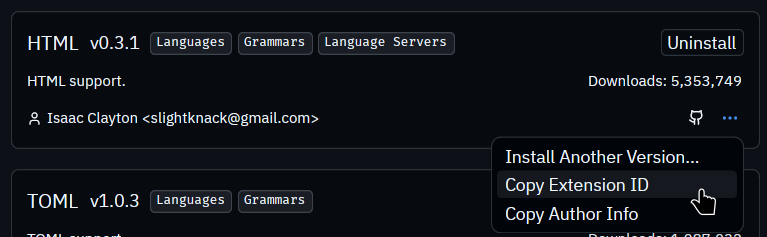
To find the extension ID, navigate to extension and click menu button:
Ease-of-setup / Use
"It just works", is mostly true with the default vscodium experience.
Reliability
To get an "it just works" experience out of Neovim, you're probably using a preconfigured experiences like NvChad or LazyVim paired with edits by your LLM of choice.
While these are nice, I've found that depending on your environment, updates over time, the one random dependency update you decided to update or delete, misconfiguration -- it just seems like you always end up with a text editor that breaks a little too often to be reliable and productive. Often, it doesn't support that one feature you need: so you go get a new plugin, spend hours configuring it, and start the cycle all over again.
Performance
VSCode is bloated, I'll admit. This is mostly due to it's javascript and electron base. With the right configurations though, it can perform OK on decently recent hardware.
One notable configuration setting that significantly improves the feeling of emulated vim inside VSCode is:
"extensions.experimental.affinity": {
  "vscodevim.vim": 1,
},
However, it definitely isn't nvim. And it definitely isn't Zed. As I've been exploring Zed, I've greatly appreciated its' performance. The instant boot times remain consistent across every single project I've opened, even with a decent amount of plugs and multiple projects opened within a single window.
Get my dotfiles
Check out for yourself my dotfiles, or ask your llm to incorporate pieces you like into your own configs.